
August 28, 2026 Release Notes
Enhancements
Dark Mode Switcher
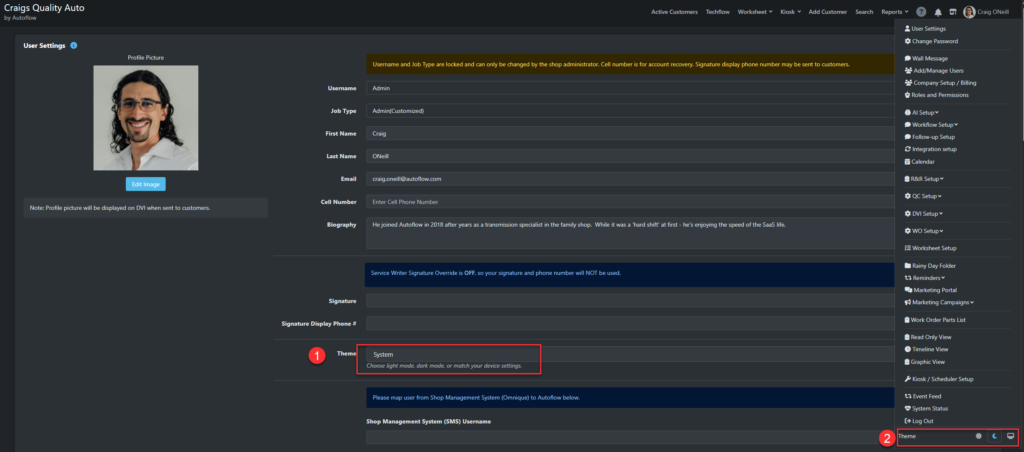
Having to dig into your browser settings just to get dark mode in Autoflow wasn’t exactly convenient. Maybe you run light mode everywhere else but want dark mode in Autoflow, or the other way around. We get it.
Now you can set light or dark mode directly inside the application. Find the option in two spots:
- Your user settings page
- The bottom of your user menu
QC/WO Microsite
The quality control and work order microsites, the pages your clients see when you share a QC form or work order, have been upgraded to v4. You can preview the new look before sending anything by opening the send modal from the QC or WO and clicking preview.
Calendar QuickAdd Option
By default, the calendar uses the quick add modal when you create a new client. If you’d rather use the fuller add customer option, you can now set that as your preference in user settings.
Scroll to the bottom of user settings and toggle on “Add appointment opens, add customer.” Quick add is built for speed, but the full add customer flow gives you more options while creating an appointment.
Shop-Ware Appointments
This release builds on last release’s Shop-Ware calendar improvements, rounding out functionality for all the intended appointment behaviors.
V4 APIs
This release includes technical improvements to the partner integration layer built on top of the updated v4 platform.
Customer Search
The customer search utility got some under the hood improvements this release, aimed at cutting down the slowdowns you’d run into while pulling up history records or finding a client profile.
Tekmetric Integration
Phone numbers can now be used across multiple profiles, thanks to improved logic in the Tekmetric integration.
Marketing Module
Editing a campaign inside the fifteen minute window before it’s set to execute now prompts you with a warning that it will revert to a draft. Accept the warning and it becomes a draft. Decline it and it stays as is.
Previously this reverted automatically, which caused some confusion, so now you get the choice. This prompt only appears inside that fifteen minute execution window.
Deferred Service Microsite
All links now work correctly on the v4 deferred service microsite, for anyone using the marketing module to follow up on declined items.
Quality Control v4
Hard cutover. The quality control v4 page is now the only quality control page. Thank you to everyone who reported issues and gave feedback throughout the previous cycles.
Please keep reporting any bugs you find. V4 page bugs stay high priority.
Digital Approval
The RO authorization page now reads “cash/debit” instead of “check” for that payment type, so clients won’t get tripped up seeing “check” as an option.
Bugs
Dark Mode
Several corrections landed in this release to improve dark mode, so you can enjoy the shade without having to cast any.
Reporting
A bug preventing the “This Month” option from loading in the DVI report has been corrected.
Rainy Folder
The item count under the review DVI concern button in the Rainy Folder wasn’t auto refreshing after changes. That’s fixed now.
V4 Work Order
V4 work order completion time no longer requires fractions.
Text/Email Slideout
Adding multiple emails separated by commas no longer creates duplicates.
Misc V4 Bugs
This release also includes a wide variety of minor v4 bug fixes across multiple pages in the application, improving the v4 experience across the board.
Keep sending any v4 bugs you find to support@autoflow.com. They get prompt attention and stay high priority. Thanks for taking the time to report what you run into.
July 15, 2026 Release Notes
Enhancements
v4 Marketing: Unified Panel Redesign
The marketing experience in v4 has been redesigned from the ground up. What was previously a portal style launchpad, a grid of cards you clicked into one at a time, is now a unified command center with a persistent sidebar navigation and a live overview dashboard.
At a glance, you can now see active campaigns, messages sent, open rate, audience segments, and email templates without navigating away from a single screen. The sidebar organizes your tools into three clear sections: Marketing, Campaigns, and Automations.
This is arguably the most significant interface change in the platform this release cycle. Less jumping around, more seeing the full picture.
v4 Dark Mode
v4 pages now respond to your browser’s dark mode setting automatically. No toggle inside Autoflow required.
To enable it in Chrome:
- Open Chrome Settings
- Go to Appearance
- Set Theme to Dark
Dark mode applies to all v4 pages. Because the Active Customers page has not yet been migrated to v4, it is not covered by this setting. However, the Active Customers page has its own dark mode toggle available in the lower left corner of the screen, keeping things consistent in the meantime.
Shop-Ware Integration: Level 7
The Autoflow integration with Shop-Ware has been elevated to Level 7. This level indicates the Autoflow calendar stays in sync with Shop-Ware regardless of where appointments are added or modified.
VIN Scanner: QR Code Support
Some newer vehicles, particularly 2018 and later model year Toyotas and recent GM models, use QR codes on their door jamb labels rather than traditional barcodes. Autoflow’s VIN scanner now supports transcription and decoding of these QR codes directly using your device’s camera, closing a gap that has been a frequent request from service specialists.
Note: V4 pages with the VIN scanner will transcribe and decode. V3 VIN scan will only transcribe.
v4 DVI: Category Video Toggle
A new per category toggle in the v4 DVI sheet setup lets you show or hide the Add Video row at the top of each inspection category. For shops that don’t use category level video capture, this keeps the technician’s view clean.
Please note: while the toggle exists now in the DVI Sheet Setup, and is JSON file supported for exports, imports, duplication, and sharing, the results of the toggle will not affect v3 DVIs.
The v4 DVI is getting closer, and this is one item that will make it even more enjoyable.
Reporting: Increased Pagination Threshold
Reporting records in v4 now paginate starting at 250 records rather than a lower threshold. Alongside this, a set of broader backend performance improvements has been applied across v4 pages.
June 17, 2026 Release Notes
From Your Feedback
v4 Work Order: Mobile Experience Improvements
We heard you. The v4 Work Order interface has been updated to be more friendly for mobile users, based on feedback we received from the field.
If you took a look at the v4 Work Order in the past and weren’t sold on the experience, we’d encourage you to revisit it. More improvements are on the way, and we appreciate everyone who took the time to share their thoughts.
Enhancements
AI Note Rewrite: Now Available in Quality Control and Work Orders
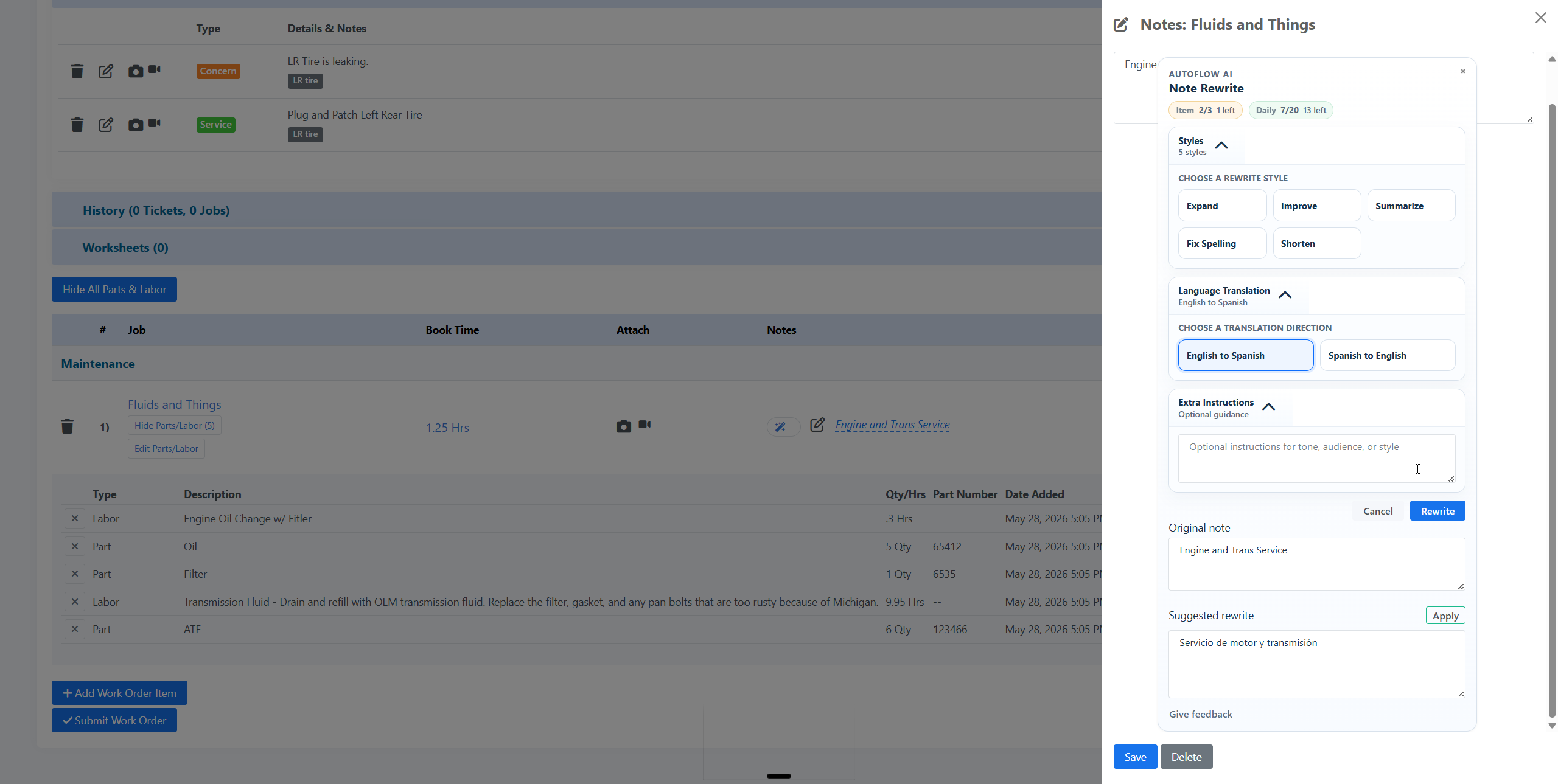
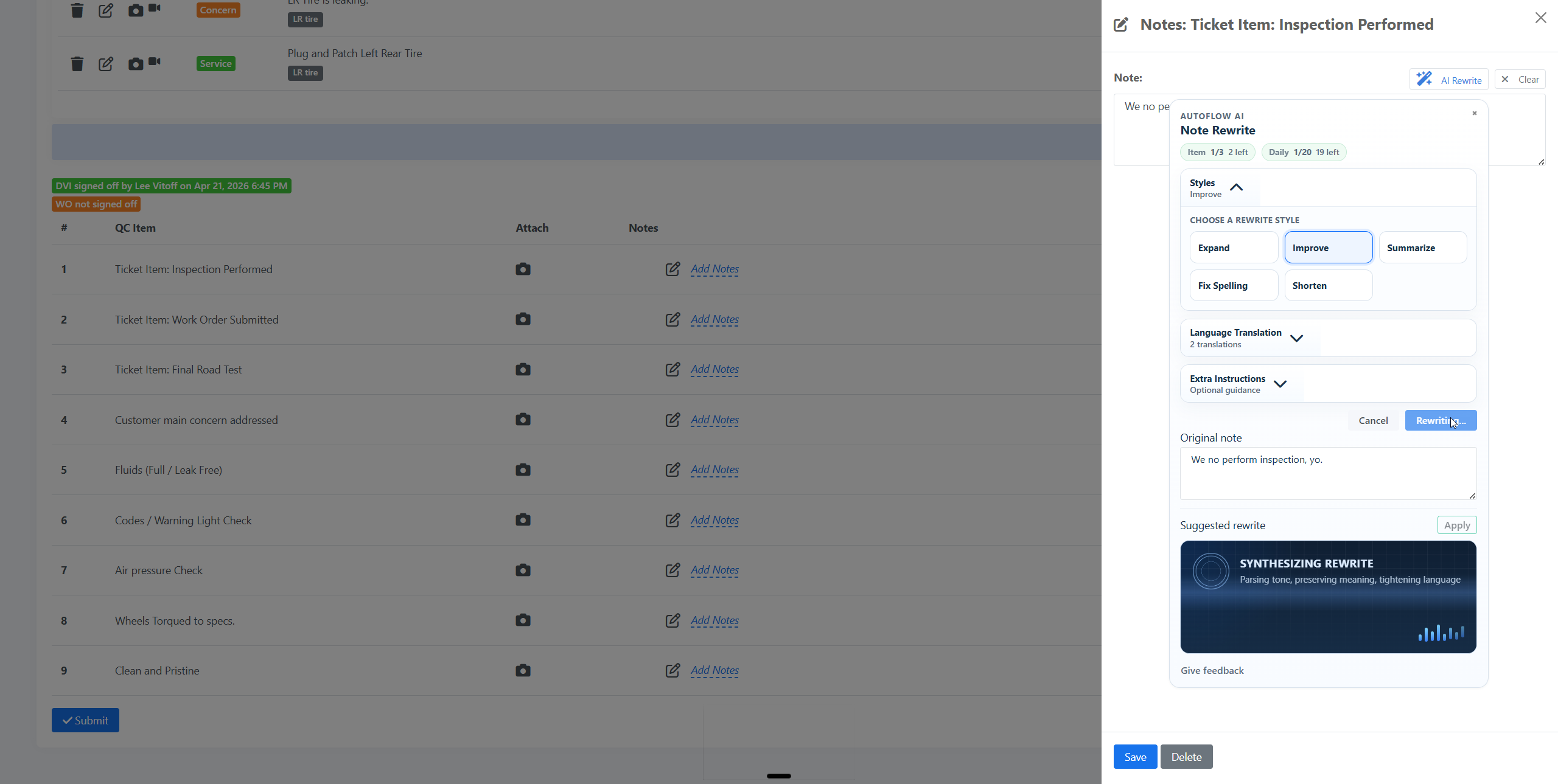
The AI Note Rewrite button has expanded beyond the DVI. It is now available inside the v4 Quality Control form and the v4 Work Order.
For anyone not yet familiar with the feature: AI Note Rewrite allows any staff member to take a rough or unclear note and clean it up with one click. Choose from rewrite styles including Expand, Improve, Summarize, Fix Spelling, and Shorten. Review the suggestion, accept it or modify it, and move on. The system tracks all AI activity in the change log, and customers never see any indication that AI was involved.
One capability worth highlighting specifically: the feature includes Language Translation, supporting, for now, both English to Spanish and Spanish to English. For shops with bilingual staff or customers, this is a practical tool for making sure notes communicate clearly across the board.
If you have requests supporting other languages, please send them to us at support@autoflow.com.
The v4 DVI will be receiving this feature in an upcoming release. The v3 DVI, where AI Note Rewrite already lives, is unchanged.
Slim Work Order Now Accessible from the QC Form
While performing a quality control inspection, staff can now open the Slim Work Order in a side panel without leaving the QC sheet. This gives whoever is conducting the QC a clear view of all jobs, parts, labor, and part numbers associated with the visit, right where they need it.
This is particularly useful when the person performing QC wasn’t part of the original repair conversation and needs to quickly get up to speed on what was actually done.
Active Customers Report: Kiosk Appointment Column
The Active Customers Report now includes a Kiosk Appointment column, making it easy to see at a glance which active visits originated from a kiosk booking. Shops using the kiosk for self-check-in will find this helpful for understanding their current floor traffic at a higher level.
v4 Reporting: Significant Performance and Coverage Improvements
Several v4 reports have been added or upgraded in this release, along with backend infrastructure improvements that benefit the reporting suite as a whole.
New and Migrated Reports
The following reports are now available or updated in v4:
- DVI Report
- Work Order Report
- Group Sheets Report
- Quarterly Sales Report
Cache Layer
A caching layer has been added to the v4 reporting engine. Reports that previously required waiting on heavy queries will now load significantly faster, particularly for shops with large datasets or complex date ranges.
Sales Report: DVI Completion and Benchmark Score Columns
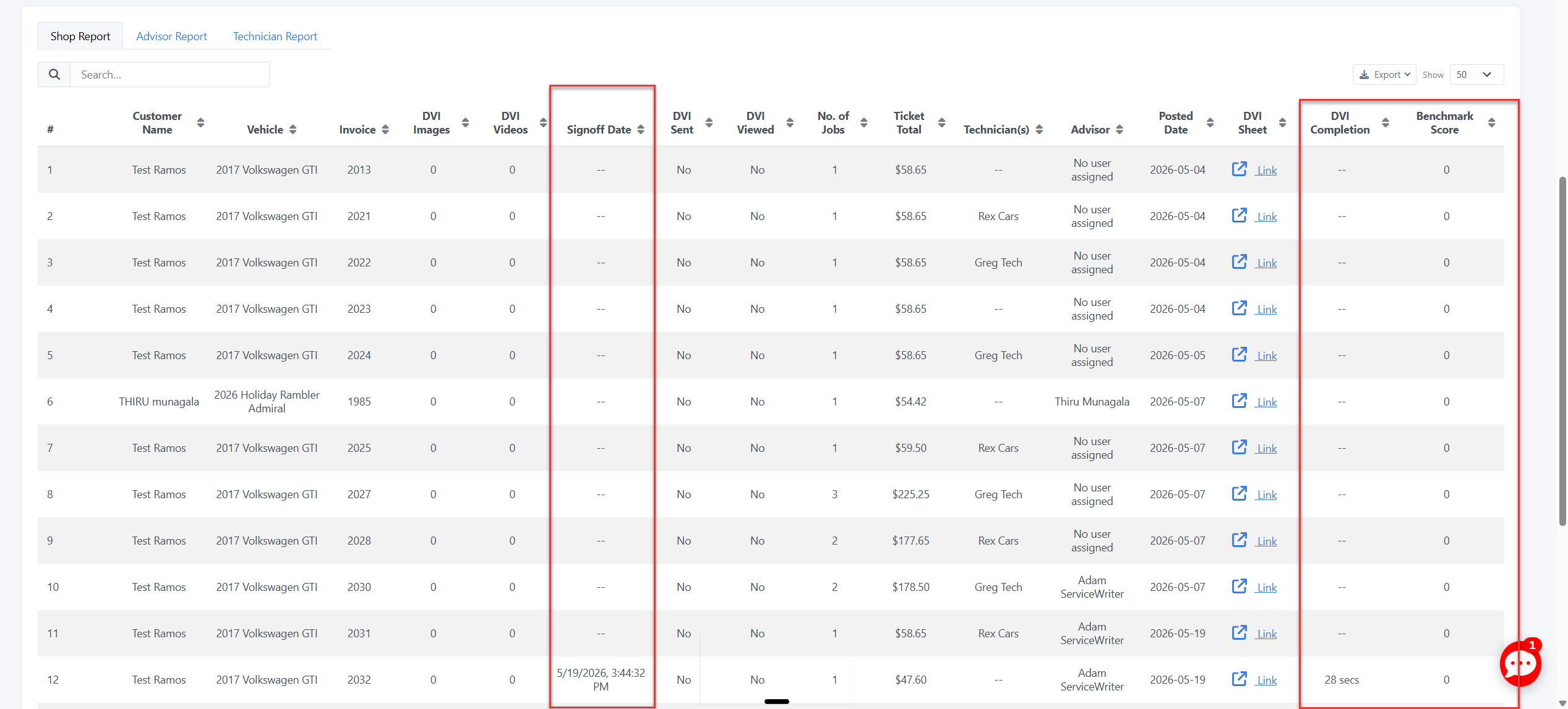
The Sales Report spreadsheet now includes columns for DVI Completion and DVI Benchmark Score alongside corresponding repair orders. These additions make it easier to correlate inspection activity with sales data in a single export.
Note: The layout of these columns within the report is something we are actively looking to refine in a follow-up update.
Sales Report: DVI Completed Timestamp
The Sales Report now includes the timestamp for when a DVI was completed, adding another useful data point for shops tracking inspection workflow timing.
Protractor: ETC Now Syncs with Promised Time
For Protractor users, the Estimated Time of Completion in autoflow will now sync with the promised time set in Protractor. The two will stay in alignment without requiring separate entry in both systems.
v3 DVI: Submit Button Relabeled on Signed-Off Inspections
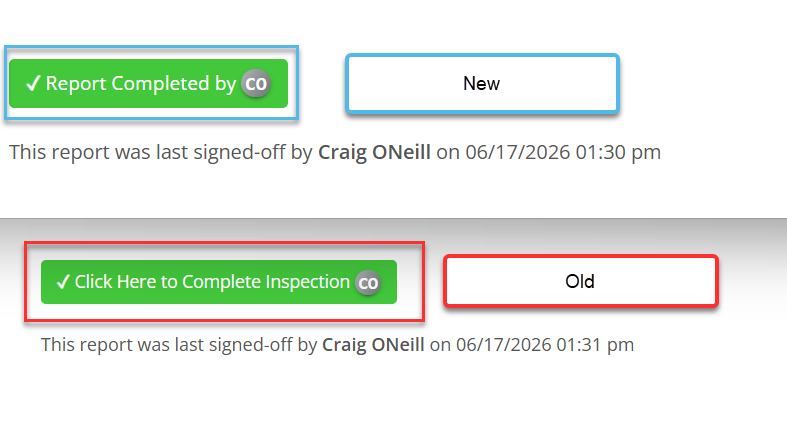
On a DVI that has already been signed off, the button at the bottom of the inspection previously read “Click Here to Complete Inspection,” which was misleading since the inspection was already done. It now reads “Report Completed by [user],” accurately reflecting the current state of the inspection.
Tireshop Integration Improvements
Several enhancements have been made to the Tireshop integration, including API improvements that strengthen the connection between Tireshop and autoflow. Tireshop users can expect credit card surcharge to be calculated within the RO authorization.
Backend Improvements
This release includes backend work to improve search reliability and performance, including additional logging around customer search to address cases where valid data was not surfacing as expected. Cronjob updates were also made to improve platform stability, and internal administrative tooling has been updated to better manage settings across the platform.
Bug Fixes
Reporting
- MSO Report: Imported customers no longer counted as new tickets. When shops import a customer list (for example, for a marketing audience), those records were previously being counted as newly created tickets in the MSO Report. This was causing inflated new customer counts and skewing inspection ratios in some isolated cases. This has been corrected.
- MSO Report: Numerical sorting now works as expected. An issue where values like 9 and 94 were sorted together rather than in proper numerical order has been resolved across both v3 and v4.
- MSO Report: Clicking a shop name now opens the correct location. In some cases, clicking a shop name in the v4 MSO Report was opening historical records for a different location within the organization. This now consistently opens the correct shop.
- MSO Report: Expanding rows beyond row 10 now works correctly. Entries beyond the first page of results could not be expanded. This has been resolved.
- Engaged Report: Kiosk scheduler stat now based on appointment date, not creation date. The kiosk scheduler metric was previously counting appointments by when they were created, not by when they were scheduled to occur. This meant a shop reviewing a date range could see appointments booked during that period but scheduled for entirely different dates, making the data misleading. It now reflects the actual appointment date.
- Engaged Report: Enabling all charts now saves correctly. When enabling all charts in the Engaged Report, the selections were reverting to disabled rather than saving. This has been corrected.
- DVI Report: Completion time no longer shows 00 Sec(s) on inspections with no notes. DVIs signed off with no notes marked on any line items were returning an initial completion time of 00 seconds. This has been corrected.
Marketing
- Continuous campaigns: Send triggers now calculating recipients correctly. An issue causing send triggers in continuous campaigns to miscalculate recipients has been resolved.
- Marketing mailers: Standard class and first class pricing now updates correctly. Switching between standard and first class pricing in the v4 marketing mailer was not updating the final price shown. This has been fixed.
- Marketing campaign setup: “Text” relabeled to “Message.” The label in marketing campaign setup has been updated from “text” to “message” to better reflect that the setting applies to multiple communication types, not text messages exclusively.
Integrations
- Protractor: WO RVH notes now push back to Protractor correctly. Work Order RVH notes entered in v4 were not pushing back to Protractor as expected. This has been resolved.
- Protractor: Recommended packages now push correctly after initial DVI submission. Recommended packages were not pushing to Protractor if they were added after the initial DVI submission. This has been corrected.
- Protractor: DVI job mapping no longer appears twice in setup. Jobs were showing up twice in the DVI Sheet Setup Protractor mapping, once with the name and once with only the code. This has been fixed.
Quality Control
- v4 QC Sheet: Multiple images can now be uploaded at once. Previously, images had to be uploaded one at a time. Bulk image upload is now supported.
DVI
- MotoVisuals videos no longer satisfy DVI photo requirements. Educational videos from MotoVisuals that are auto-attached to DVI line items were incorrectly being counted as images, satisfying photo requirements they should not fulfill. A MotoVisuals video is not a substitute for a documented photo of a vehicle’s condition. These are now treated separately.
- DVI Auto Push: Push to SMS event now logged in change log. When a DVI is automatically pushed to SMS upon signoff, that event is now recorded in the change log for accountability and audit purposes.
Work Orders
- v4 Work Order Changelog: Images can now be re-downloaded. The ability to download images directly from the changelog, which has long existed in the v3 DVI and other autoflow worksheets, is now consistent in the v4 Work Order changelog as well.
- v4 Work Order: SMS History now includes “Collect All History” button. This button, which was missing from the SMS History section of the v4 Work Order, has been restored.
Scheduler
- Scheduler: Now advances to next month when no availability exists. The scheduler was not moving forward to the next available month when the current month had no open slots. This has been corrected.
- Scheduler Setup: Bay selection now available during service creation. Previously, bay assignments could only be added after a service was created. Bay selection is now available at the time of creation.
Video
- HEVC (H.265) video uploads now convert correctly. Videos recorded in the H.265 codec were uploading without proper conversion, causing playback issues. These videos will now be converted correctly on upload.
Rewards
- Rewards: Lifetime points now calculated correctly. Rewards levels were not properly accounting for lifetime points, and manually added points were not being included in lifetime totals. Both have been corrected.
Additional Fixes
Multiple additional stability and error fixes were addressed across the DVI, Work Order, Quality Control, scheduler, customer profile, and settings areas of the platform.
Apr 22, 2026 Release Notes
Enhancements
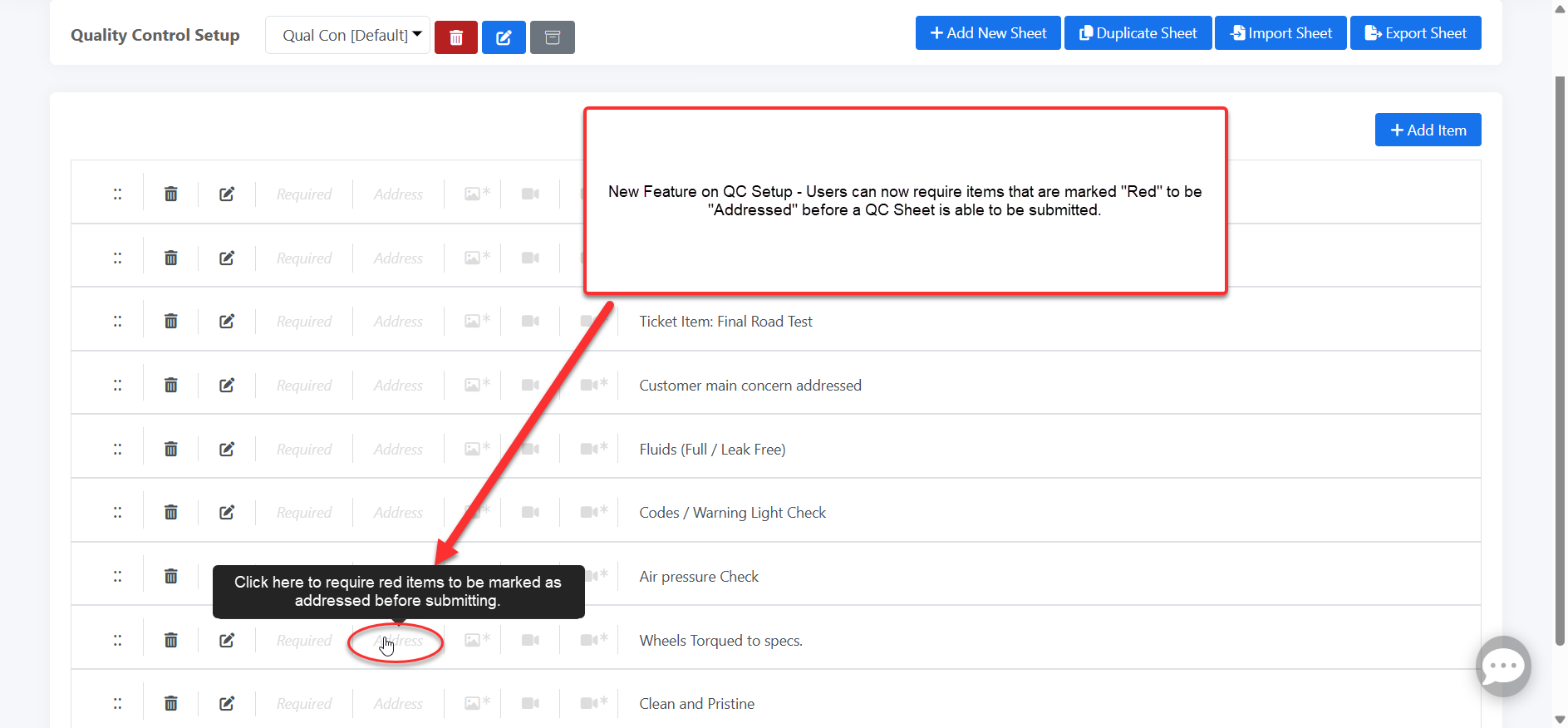
QC: Require Red Items to be Marked as Addressed before Submit:
A new administrator option in Quality Control Setup now permits you to require that items which have been marked red be addressed before a sheet can be submitted.
The requirement means that when a technician, service advisor, or you yourself find a problem on a quality control sheet and mark it red, the sheet cannot be submitted until that red item is also marked “addressed.”
LP/VIN Decode:
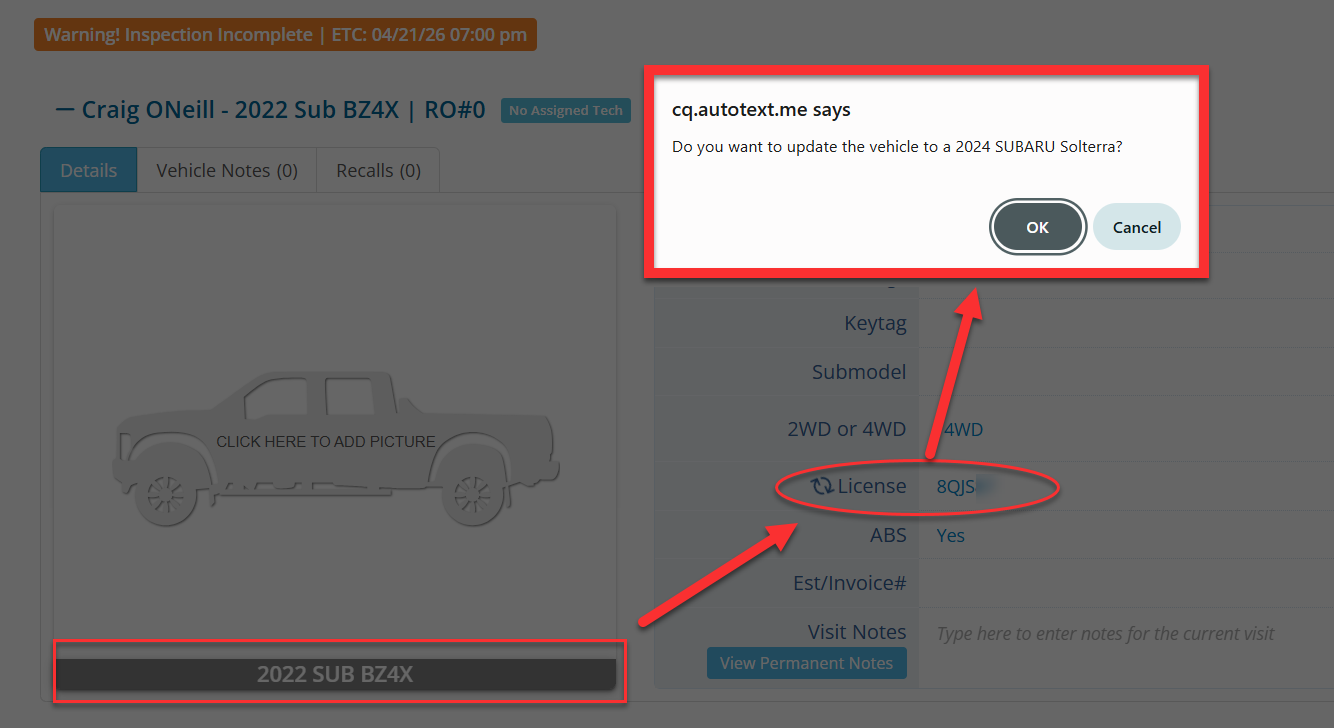
A new enhancement to the License Decoder / VIN decoder now prompts users to update to the proper vehicle if a mismatch is identified. This will also update shop management system records for many (Tekmetric, Omnique, Protractor, Shop-ware) integrations.
Default YES to Show RVH Only
Admins who prefer begin presentations with RVH in focus can now default the option to only show the RVH items in the initial send of a DVI.
The option is in DVI Sheet Setup.

v4 Online Scheduler UI / UX Improvement
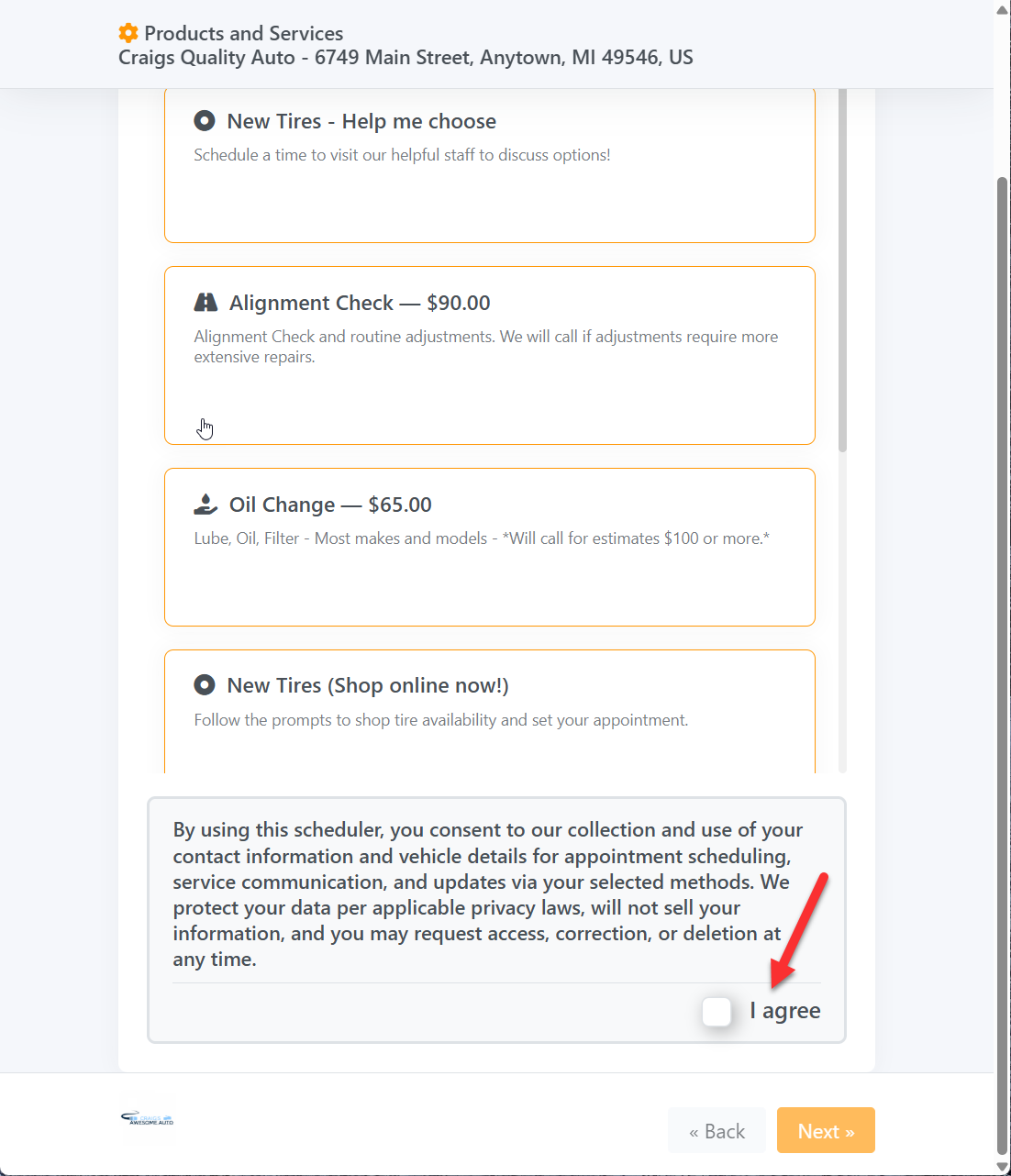
We’ve updated the view for clients with the v4 online scheduler to have a more user-friendly “I agree” button with your disclaimer. Previously, the “I agree” button was on the right of the message, but this was using up space. We’ve moved it down to the lower right section so that the entire width of the disclaimer field can be fully utilized, and a better experience on mobile devices is maintained!
WO Parts List PDF Generated with Filters
When users are creating a PDF view of the Work Order Prts List, the PDF will now be generated based on any active filters selected, rather than populating the entire parts list.
This allows you to create clean views for individuals or specific vehicles and tickets.
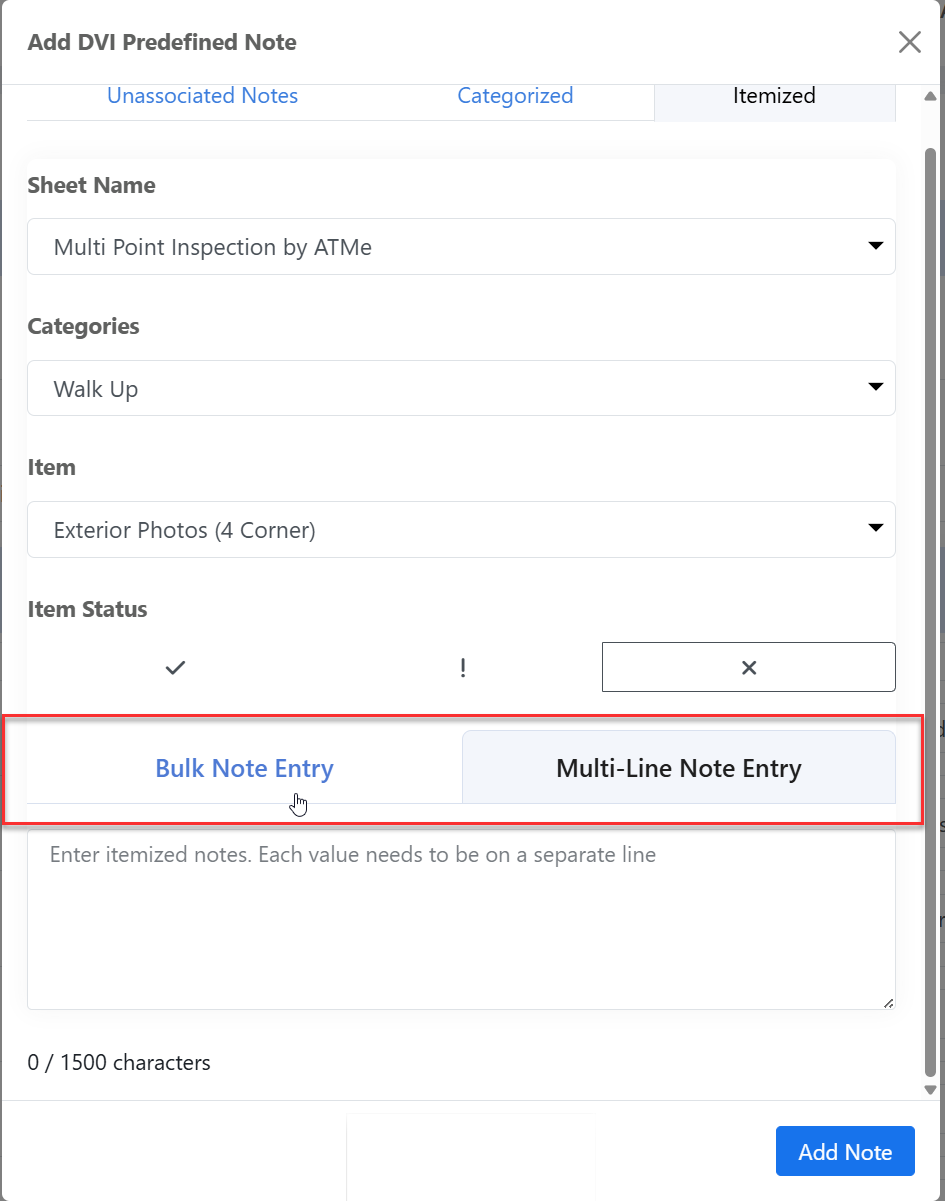
Administration of Predefined Notes
When creating predefined notes there’s now an option now to add multiple notes at once or notes with formatted line breaks.
Bug Fixes
- We’ve corrected a bug where the drag and drop in the DVI microsite for the DVI was not saving.
- An issue affecting service reminders, where conventional oil changes and synthetic oil changes were populating under the wrong category, has been addressed.
- Advisor and technician biographies were not showing up on the customer microsite. Now, the biographies will appear appropriately.
- Shopware users will once again see the option to auto-push their DVI results From their integration setup page.
- An issue preventing deletion of a category on the V4 DVI sheet setup page has been addressed.
- We’ve corrected an issue preventing the DOT number from tire inspections from appearing in the customer view when that information is filled out.
- Protractor users will now enjoy the check-in kiosk is pushing the license plate to the proper field.
- TekMetric users should once again see the engine size information in the DVI vehicle header if that information was decoded already in TekMetric.
- Starting a new conversation in the text manager should now yield results when you’re searching for an individual.
- Multiple fixes to the rainy day folder, including messages sent as soon as possible, and also the viewership of Shop Management System history.
- In the customer view of the V4 scheduler, “Previous inspection images” will now show in the “previously inspected items” section.
- Multiple other minor issues in the DVI, work order, and quality control worksheets.
Feb 17, 2026 Release Notes
Enhancements
Core Tools
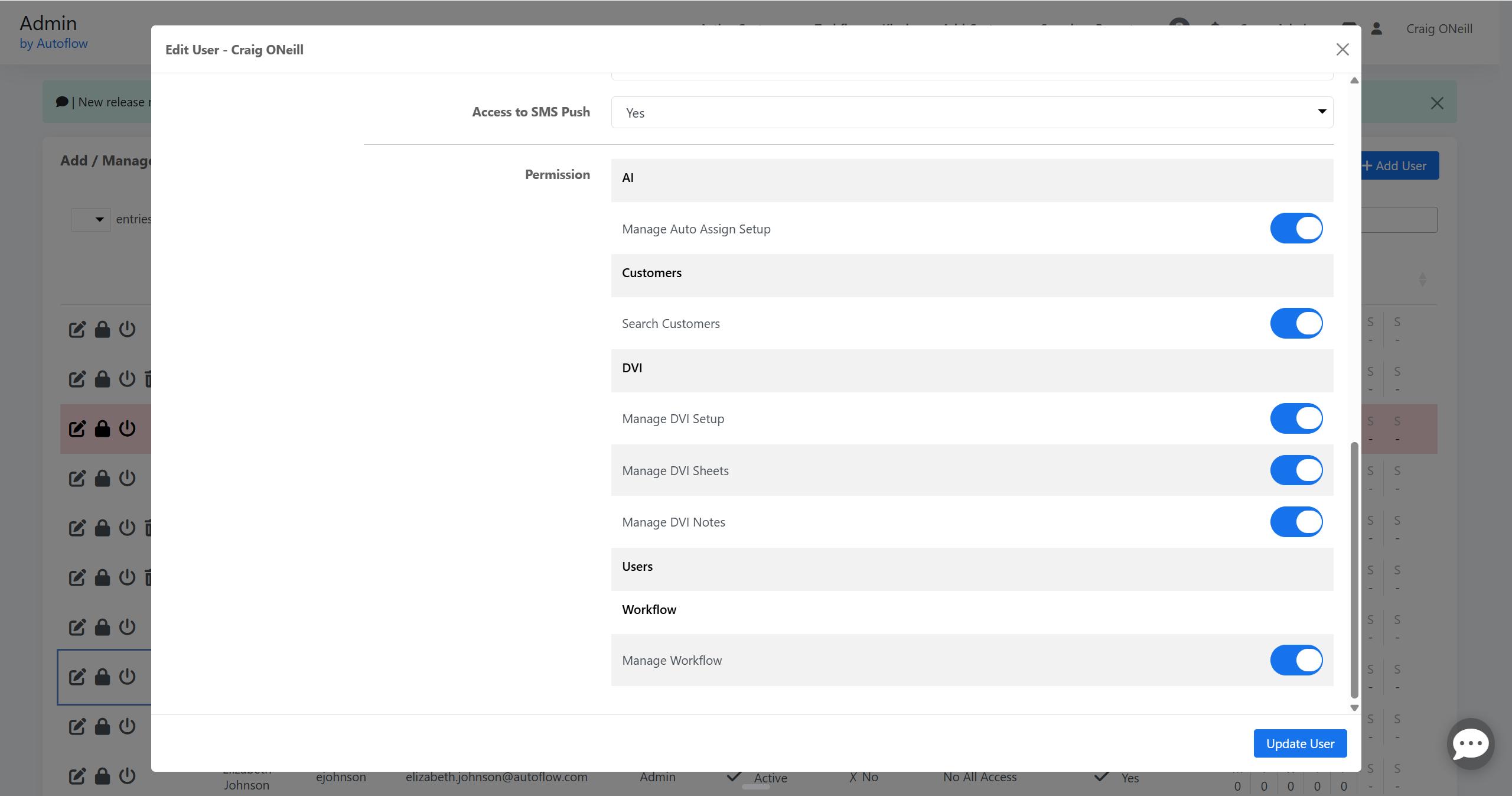
Role-based Access Control: Page‑Level Access for Setup Screens
We’ve extended the v4 role‑based permissions system so super admins can now grant or restrict access to individual setup pages, including:
- DVI Sheet Setup
- DVI Setup
- Workflow Setup
- Auto‑Assign / Auto‑Update
- DVI Notes Setup
Menu visibility and direct‑URL access are both governed by these permissions; existing admin/level‑1 users retain full access by default.
V4 Add Customer & Quick Start Improvements
The new v4 Add Customer flow is now wired into the dashboard so that:
- Visits created from v4 Add Customer / Quick Start behave the same way as legacy v3 (including appointment confirmation and day‑before reminders where applicable).
- “New Customer” lookups better handle existing records by phone, name, or email, reducing duplicate profile creation.
Customer & User Experience Polishing
- Apostrophes & Special Characters: Apostrophes and special characters are now decoded correctly in RVH notes, workflow messages, and customer‑visible areas, eliminating HTML‑style encodings like ' or '.
- Vehicle Header & Switcher: The v4 DVI/WO/QC switcher in the header has been cleaned up so it renders correctly in both Chrome and Firefox, with consistent dropdown behavior and alignment.
- Notification Copy: Several small copy issues (typos and missing words) across v4 tooltips and headers have been corrected for clarity.
Quality Control & Work Order Tools
Search for QC & WO Predefined Notes
Both QC Notes Setup and WO Notes Setup now support search inside their note lists. This makes it easier to find, review, and edit predefined notes in large libraries without scrolling through long lists.
V4 Report Performance Improvements
The v4 reporting engine has been optimized in several areas:
- QC Report now loads more quickly for large datasets.
- Underlying query work improves stability for complex date ranges and filters.
V4 Work Order Migration & Enhancements
The v4 Work Order page continues to roll forward with:
- Better handling of parts and labor edits, ensuring change log entries include description, quantity, and hours.
- More reliable clock handling when pausing/resuming or closing jobs, reducing miscounts from repeated auto‑pause events.
Scheduler & Calendar Bay Scheduler View
Scheduler Helper Text for Contact Methods
The v4 Scheduler now includes clearer helper text on the contact step, explaining that shops can accept either phone or email, and guiding returning customers to enter the primary phone/email on file. This reduces confusion and duplicate profiles.
Bay Scheduler Usability & Safety
- Deleting a bay now automatically reassigns any active and upcoming visits to a safe fallback bay, preventing “invisible” work on the bay view.
- ETC (Estimated Time of Completion) calculations from the bay scheduler have been corrected so they add the intended duration (for example one hour), rather than introducing an extra day offset.
Marketing & Payments
Marketing Execution Engine & Reporting
Marketing has been tightened up with several v4 improvements:
- The v4 execution engine now handles campaign timing more robustly, honoring “send at next interval” and weekend rules while avoiding duplicate runs.
- Campaign‑level reporting has been polished so date filters, sent/delivered counters, and audience views are all in sync.
- Campaign lists now respect deleted/archived marketing audiences and no longer surface soft‑deleted audiences in dropdowns.
Mailer Payment Flow Improvements
To reduce accidental large refunds on high‑volume mail campaigns, the marketing payment system now pre‑authorizes or places a hold for large charges earlier in the day, while finalizing later in the process. This gives finance teams a clearer view of expected spend and fewer surprises.
Text‑to‑Pay Email Behavior
Text‑to‑Pay confirmation emails now:
- Correctly send to all intended billing addresses (when multiple shop emails are configured).
- Show accurate payment confirmations without duplicating or dropping recipients.
Bug Fixes
DVI
DVI “Previous Service” Units
The “Previous Service” label in DVI history now respects the shop’s unit setting (miles vs kilometers), eliminating mismatches where previous service data appeared in the wrong units.
Mobile DVI Image & Video Behavior
- On mobile, vehicle and DVI line images now respect zoom and markup controls consistently when swiping through image galleries, including the first image.
- Videos attached to DVI line items now display correctly in RVH and customer views, including for multi‑axle tire configurations.
Predefined DVI Notes & Statuses
Multiple issues in DVI Notes Setup have been corrected:
- Adding or editing itemized notes now obeys the correct integration‑specific character limits without silently truncating text.
- Predefined notes that carry a status no longer prevent adding a second note in a different status once the first status is cleared.
- Switching between categorized and itemized views no longer causes notes to appear unsaved until a full page refresh.
Global & Unassociated DVI Notes
Unassociated/global DVI notes now:
- Populate correctly in v4 DVI Notes Setup, including on first load.
- Expand UI containers to fit their content instead of overflowing into neighboring controls.
Workflow, Dashboard, and Core Tools
RVH & Workflow Encoding Fixes
Several encoding bugs affecting RVH and workflow messages have been resolved:
- RVH notes no longer show HTML entities (<, >, ') in the UI or emails.
- Workflow status descriptions and tooltips correctly display emoji and special characters without corrupting the underlying queries.
Customer Profile & Grouping
- v4 customer profile now handles visits whose corresponding DVI or sheet has been deleted without throwing errors or miscounting “Customer Since” dates.
- Grouped customer phone numbers are reliably pulled from the phonenumbers table, and new grouped members correctly receive their own phone record.
Search & Filters
- Dashboard search has been corrected so pagination and search filters work together on appointment views, and keytag/RO filters behave consistently regardless of toggle visibility.
- Active Customer Page search respects pagination when searching appointments, rather than returning unfiltered pages.
Scheduler & Reminders
Reminders & Time Picker Fixes
- When setting custom reminders, the selected time is now saved exactly as entered (respecting the shop’s time zone) instead of being shifted to Central time.
- The AM/PM toggle on Service Reminders and custom reminder pickers has been fixed so selecting PM doesn’t silently revert to AM.
Kiosk & Bay Scheduler Behavior
- The bay scheduler now blocks slots based on the full appointment duration, not just the starting interval, so longer appointments correctly prevent overlapping bookings.
- Appointment creation from the bay scheduler now sets ETC to the appropriate duration (e.g., start time + one hour), rather than one day plus one hour.
Texting & Marketing
Text Manager & Unread Counts
- Marking messages as unread in Text Manager now updates the unread badge counts in the left‑hand conversation list immediately, without requiring a page refresh.
- Scheduled messages in Text Manager display the correct future scheduled time instead of repeating the current time.
Rainy Day & Follow‑Up Messages
- Rainy Day “ASAP send” now respects the shop’s configured marketing number and correctly logs sends and error states.
- Test follow‑up messages now include the greeting and signature so test messages match live customer experiences.
Marketing UI & Audience Behavior
- The marketing campaign audience search bar now searches by all expected fields (campaign group, campaign name, tags, send method, frequency, audience name) and returns consistent results.
- Deleted or archived marketing audiences are no longer offered in dropdowns when configuring campaigns.
- Mixed text + postcard campaigns no longer lose the postcard template selection or revert to the text‑only template tab after a template change.
Work Orders & Time Tracking
Auto‑Pause & After‑Hours Logic
- Auto‑pause no longer repeatedly pauses already‑paused clocks at lunch or after hours, preventing inflated clock times.
- New clocks started after shop closing time are no longer auto‑paused and restarted in ways that reset or corrupt the elapsed time.
Clock Rounding & Totals
- Repeated pause/resume cycles no longer accumulate stray seconds, eliminating gradual inflation of total job time by a few seconds on each cycle.
- Protractor history collection now stores the full sale amount for line items (not just a unit base rate), reducing the need for special upstream corrections in sales reports.
WO Attachments & UI
- Work Orders now allow multi‑image upload per line item without dropping images or mixing up hyperlinks.
- “Ordered” and “Arrived” labels are back on v4 WO parts lines, so status tracking for parts is visible and accurate.


