
Feb 17, 2026 Release Notes
Enhancements
Core Tools
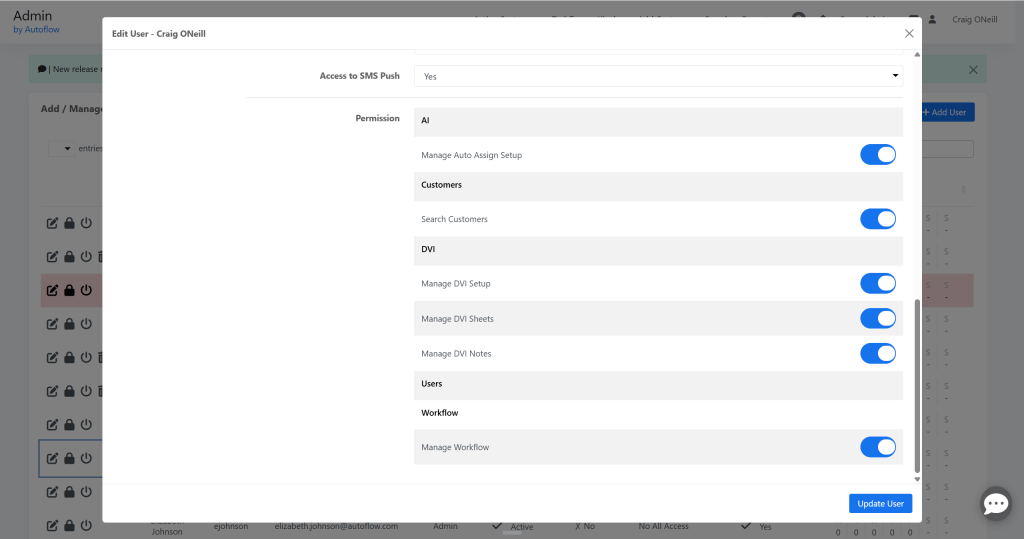
Role-based Access Control: Page‑Level Access for Setup Screens
We’ve extended the v4 role‑based permissions system so super admins can now grant or restrict access to individual setup pages, including:
- DVI Sheet Setup
- DVI Setup
- Workflow Setup
- Auto‑Assign / Auto‑Update
- DVI Notes Setup
Menu visibility and direct‑URL access are both governed by these permissions; existing admin/level‑1 users retain full access by default.
V4 Add Customer & Quick Start Improvements
The new v4 Add Customer flow is now wired into the dashboard so that:
- Visits created from v4 Add Customer / Quick Start behave the same way as legacy v3 (including appointment confirmation and day‑before reminders where applicable).
- “New Customer” lookups better handle existing records by phone, name, or email, reducing duplicate profile creation.
Customer & User Experience Polishing
- Apostrophes & Special Characters: Apostrophes and special characters are now decoded correctly in RVH notes, workflow messages, and customer‑visible areas, eliminating HTML‑style encodings like ' or '.
- Vehicle Header & Switcher: The v4 DVI/WO/QC switcher in the header has been cleaned up so it renders correctly in both Chrome and Firefox, with consistent dropdown behavior and alignment.
- Notification Copy: Several small copy issues (typos and missing words) across v4 tooltips and headers have been corrected for clarity.
Quality Control & Work Order Tools
Search for QC & WO Predefined Notes
Both QC Notes Setup and WO Notes Setup now support search inside their note lists. This makes it easier to find, review, and edit predefined notes in large libraries without scrolling through long lists.
V4 Report Performance Improvements
The v4 reporting engine has been optimized in several areas:
- QC Report now loads more quickly for large datasets.
- Underlying query work improves stability for complex date ranges and filters.
V4 Work Order Migration & Enhancements
The v4 Work Order page continues to roll forward with:
- Better handling of parts and labor edits, ensuring change log entries include description, quantity, and hours.
- More reliable clock handling when pausing/resuming or closing jobs, reducing miscounts from repeated auto‑pause events.
Scheduler & Calendar Bay Scheduler View
Scheduler Helper Text for Contact Methods
The v4 Scheduler now includes clearer helper text on the contact step, explaining that shops can accept either phone or email, and guiding returning customers to enter the primary phone/email on file. This reduces confusion and duplicate profiles.
Bay Scheduler Usability & Safety
- Deleting a bay now automatically reassigns any active and upcoming visits to a safe fallback bay, preventing “invisible” work on the bay view.
- ETC (Estimated Time of Completion) calculations from the bay scheduler have been corrected so they add the intended duration (for example one hour), rather than introducing an extra day offset.
Marketing & Payments
Marketing Execution Engine & Reporting
Marketing has been tightened up with several v4 improvements:
- The v4 execution engine now handles campaign timing more robustly, honoring “send at next interval” and weekend rules while avoiding duplicate runs.
- Campaign‑level reporting has been polished so date filters, sent/delivered counters, and audience views are all in sync.
- Campaign lists now respect deleted/archived marketing audiences and no longer surface soft‑deleted audiences in dropdowns.
Mailer Payment Flow Improvements
To reduce accidental large refunds on high‑volume mail campaigns, the marketing payment system now pre‑authorizes or places a hold for large charges earlier in the day, while finalizing later in the process. This gives finance teams a clearer view of expected spend and fewer surprises.
Text‑to‑Pay Email Behavior
Text‑to‑Pay confirmation emails now:
- Correctly send to all intended billing addresses (when multiple shop emails are configured).
- Show accurate payment confirmations without duplicating or dropping recipients.
Bug Fixes
DVI
DVI “Previous Service” Units
The “Previous Service” label in DVI history now respects the shop’s unit setting (miles vs kilometers), eliminating mismatches where previous service data appeared in the wrong units.
Mobile DVI Image & Video Behavior
- On mobile, vehicle and DVI line images now respect zoom and markup controls consistently when swiping through image galleries, including the first image.
- Videos attached to DVI line items now display correctly in RVH and customer views, including for multi‑axle tire configurations.
Predefined DVI Notes & Statuses
Multiple issues in DVI Notes Setup have been corrected:
- Adding or editing itemized notes now obeys the correct integration‑specific character limits without silently truncating text.
- Predefined notes that carry a status no longer prevent adding a second note in a different status once the first status is cleared.
- Switching between categorized and itemized views no longer causes notes to appear unsaved until a full page refresh.
Global & Unassociated DVI Notes
Unassociated/global DVI notes now:
- Populate correctly in v4 DVI Notes Setup, including on first load.
- Expand UI containers to fit their content instead of overflowing into neighboring controls.
Workflow, Dashboard, and Core Tools
RVH & Workflow Encoding Fixes
Several encoding bugs affecting RVH and workflow messages have been resolved:
- RVH notes no longer show HTML entities (<, >, ') in the UI or emails.
- Workflow status descriptions and tooltips correctly display emoji and special characters without corrupting the underlying queries.
Customer Profile & Grouping
- v4 customer profile now handles visits whose corresponding DVI or sheet has been deleted without throwing errors or miscounting “Customer Since” dates.
- Grouped customer phone numbers are reliably pulled from the phonenumbers table, and new grouped members correctly receive their own phone record.
Search & Filters
- Dashboard search has been corrected so pagination and search filters work together on appointment views, and keytag/RO filters behave consistently regardless of toggle visibility.
- Active Customer Page search respects pagination when searching appointments, rather than returning unfiltered pages.
Scheduler & Reminders
Reminders & Time Picker Fixes
- When setting custom reminders, the selected time is now saved exactly as entered (respecting the shop’s time zone) instead of being shifted to Central time.
- The AM/PM toggle on Service Reminders and custom reminder pickers has been fixed so selecting PM doesn’t silently revert to AM.
Kiosk & Bay Scheduler Behavior
- The bay scheduler now blocks slots based on the full appointment duration, not just the starting interval, so longer appointments correctly prevent overlapping bookings.
- Appointment creation from the bay scheduler now sets ETC to the appropriate duration (e.g., start time + one hour), rather than one day plus one hour.
Texting & Marketing
Text Manager & Unread Counts
- Marking messages as unread in Text Manager now updates the unread badge counts in the left‑hand conversation list immediately, without requiring a page refresh.
- Scheduled messages in Text Manager display the correct future scheduled time instead of repeating the current time.
Rainy Day & Follow‑Up Messages
- Rainy Day “ASAP send” now respects the shop’s configured marketing number and correctly logs sends and error states.
- Test follow‑up messages now include the greeting and signature so test messages match live customer experiences.
Marketing UI & Audience Behavior
- The marketing campaign audience search bar now searches by all expected fields (campaign group, campaign name, tags, send method, frequency, audience name) and returns consistent results.
- Deleted or archived marketing audiences are no longer offered in dropdowns when configuring campaigns.
- Mixed text + postcard campaigns no longer lose the postcard template selection or revert to the text‑only template tab after a template change.
Work Orders & Time Tracking
Auto‑Pause & After‑Hours Logic
- Auto‑pause no longer repeatedly pauses already‑paused clocks at lunch or after hours, preventing inflated clock times.
- New clocks started after shop closing time are no longer auto‑paused and restarted in ways that reset or corrupt the elapsed time.
Clock Rounding & Totals
- Repeated pause/resume cycles no longer accumulate stray seconds, eliminating gradual inflation of total job time by a few seconds on each cycle.
- Protractor history collection now stores the full sale amount for line items (not just a unit base rate), reducing the need for special upstream corrections in sales reports.
WO Attachments & UI
- Work Orders now allow multi‑image upload per line item without dropping images or mixing up hyperlinks.
- “Ordered” and “Arrived” labels are back on v4 WO parts lines, so status tracking for parts is visible and accurate.


